The Modern Restaurant Launch Playbook: How to Open, Operate & Scale with TabTake
Planning to open a new restaurant or takeaway? Follow our complete step-by-step launch guide???from menu engineering and kitchen setup to building a commission-free online ordering powerhouse with TabTake.
Launching a new restaurant is one of the most exciting, fast-paced, and rewarding ventures an entrepreneur can undertake. Yet in today???s competitive hospitality climate, great food alone is no longer enough. With food costs fluctuating and third-party delivery marketplaces taking up to 35% commission on every order, setting up the right operational and digital infrastructure from Day 1 is the difference between surviving and dominating your market.
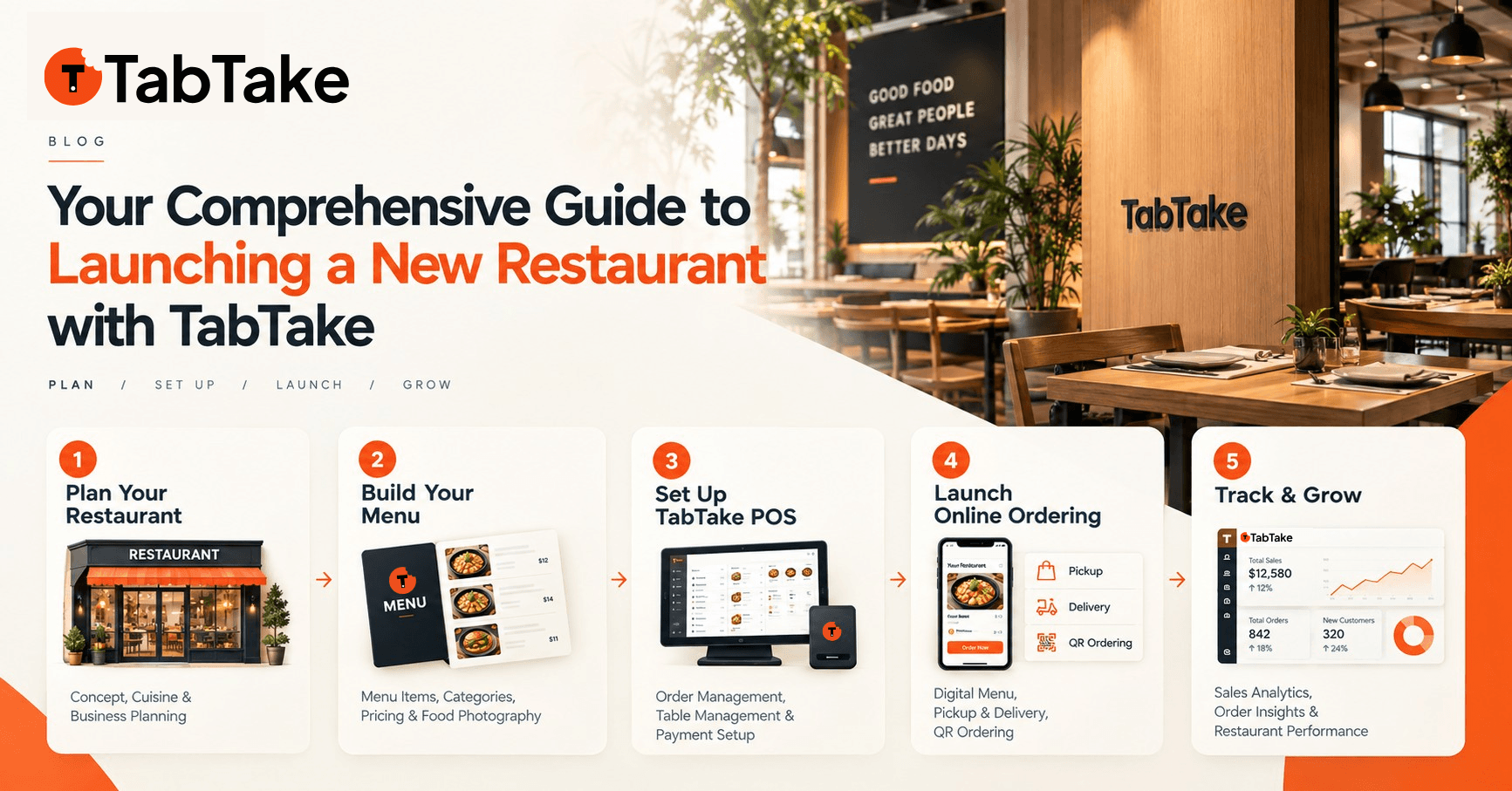
In this comprehensive guide, we break down every stage of launching a profitable modern food business???from concept validation and menu engineering to kitchen hardware setup and building a commission-free digital ordering engine with TabTake. Whether you are launching a bustling high-street burger spot, a boutique artisan cafe, or a scalable multi-unit concept, this blueprint provides your roadmap to success.
Phase 1: Define Your Concept, Audience & Menu Engineering
Every thriving hospitality venue begins with a clear culinary and brand identity. Before investing in commercial leases or kitchen equipment, validate your core offering:
- Carve Out a Defensible Niche: Analyze competing restaurants in your target radius. Identify gaps in cuisine variety, operating hours (e.g. late-night dessert or morning breakfast), or speed of service.
- Engineer for Margin & High Delivery Integrity: Design a focused menu of 15 to 30 hero items. Select dishes with high gross margins (65%+), minimal prep bottlenecks, and ingredients that travel well in eco-friendly delivery packaging without getting soggy.
- Structure Modifiers & Upsell Bundles: Build out custom choices (protein choices, cheese upgrades, side additions, drink combos). TabTake???s menu builder allows you to group mandatory options and optional add-ons to automatically lift Average Order Value (AOV) by 15% to 25%.
Phase 2: Secure Your Location, Licenses & Kitchen Infrastructure
Physical operations require meticulous planning to ensure health, safety, and operational flow:
- Commercial Location & Foot Traffic: Evaluate footfall, parking accessibility, and ease of courier pickup. Ensure the premises have adequate extraction, grease trap compliance, and reliable high-speed broadband.
- Permits & Regulatory Compliance: Secure local food hygiene registrations, premises licenses, fire safety clearance, and health inspection certificates well in advance of your launch date.
- Kitchen Printing & Hardware Workflow: Eliminate chaos on the line. TabTake seamlessly connects with standard thermal ESC/POS kitchen printers, kitchen display systems (KDS), and counter tablets. Incoming pickup, delivery, and dine-in orders print automatically with clear allergen and modifier notes.
Phase 3: Set Up Your Commission-Free Digital Ordering with TabTake
Why pay hundreds or thousands of pounds/dollars every month in marketplace fees when you can own your digital channel? Setting up your restaurant on TabTake takes just a few clicks via the interactive Store Setup Wizard:
1. Connect Your Brand & Custom Domain
Give your customers a premium ordering experience on your own domain (e.g., order.yourrestaurant.com). TabTake offers bespoke, modern storefront themes with customizable brand colours, hero banners, and lightning-fast mobile performance.
2. Configure Interactive Polygon Delivery Zones
Take complete control over where and when your drivers deliver. With TabTake???s visual map editor, you can:
- Draw precise custom polygon zones or radius boundaries on the live map.
- Set distance-tiered delivery fees and minimum order amounts per zone.
- Offer free delivery incentives above specific order thresholds to incentivize larger group orders.
3. Activate Instant Direct Payments
Connect Stripe in seconds to receive next-day payouts directly into your restaurant bank account. Support all customer payment preferences: Apple Pay, Google Pay, Visa, Mastercard, and Cash on Collection/Delivery.
4. Enable Smart QR Code Dine-In Table Ordering
If your restaurant offers on-site seating, generate table-specific QR codes directly inside TabTake. Guests can scan with their phone camera, browse high-res photos, customize their meal, and pay instantly without waiting for staff???reducing front-of-house labor overhead while speeding up table turnover.
Phase 4: Staff Training & Kitchen Trial Runs
Smooth launches require confident, well-drilled teams. Before opening the doors to the public:
- Run End-to-End Test Orders: Place test orders across all channels (Delivery, Collection, and QR Dine-In). Ensure print dockets fire instantly to the correct prep stations.
- Train Staff on the Live Order Dashboard: Train shift managers on order status transitions (New → In Kitchen → Ready for Pickup / Out for Delivery), auto-printing triggers, and managing busy periods with live order delay buffers.
- Set Prep Time Rules: Establish realistic kitchen lead times (e.g., 20 minutes off-peak, 40 minutes during weekend rushes) so customer delivery ETAs remain accurate.
Phase 5: Soft Launch, Marketing & Grand Opening
Building momentum before your official launch date turns your opening week into a massive success:
- Host an Exclusive Soft Opening: Invite friends, family, local business neighbours, and food bloggers for an invite-only tasting session. Use this live test to refine ticket times, packaging, and station bottlenecks.
- Drive Direct Traffic with Launch Discounts: Create promotional coupon codes (e.g.
LAUNCH20for 20% off first orders) exclusively on your TabTake direct storefront. - Leverage Customer Loyalty from Day One: TabTake???s built-in customer rewards system encourages repeat orders by awarding points on every purchase, automatically converting one-time trial customers into loyal regulars.
- Capture Local SEO & Google Business Profile: Link your official direct ordering URL prominently as your primary order link on Google Maps, Instagram bio, and TikTok to bypass aggregator commissions.
Why TabTake Is the #1 Choice for New Restaurants
Unlike legacy POS providers that lock you into proprietary clunky hardware or third-party marketplaces that withhold your customer contact data, TabTake gives you complete freedom:
- 0% Commission on Direct Orders: Keep 100% of what you earn. Check out our transparent subscription plans.
- Full Customer Ownership: Access customer emails, phone numbers, and order histories for direct SMS and marketing campaigns.
- Multi-Location Scalability: Expand from your first location to 5, 10, or 50 locations with unified chain reporting and centralized menu syncing.
- Rapid Onboarding: Get your complete store online and ready for business in as little as 24 to 48 hours.
Ready to Launch Your Restaurant? Book a 1-on-1 TabTake Demo
Whether you are in the planning stage, actively building out your kitchen, or ready to switch from high-fee aggregators, our hospitality technology specialists are here to help you design the ultimate setup.
Book a free live demo on the TabTake website today to get hands-on access to our ordering engine, explore customized hardware integrations, and discover how much your restaurant can save.
Take the First Step Toward Your Dream Restaurant
Explore our solutions, test out live storefront themes, and see how TabTake can power your grand opening.